


LiveUp- Video Chat
4.225.00 Reviews
App Specs
- Version
- 4.3.6
- Updated On
- License
- Free
- Downloads
- 5,000,000+
- Developer
- Insight-Innov
- Categories
- Lifestyle
- Platform
- Android
Screenshots
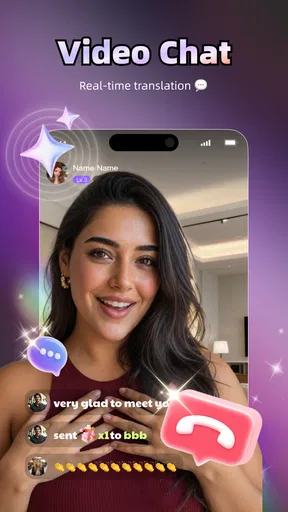
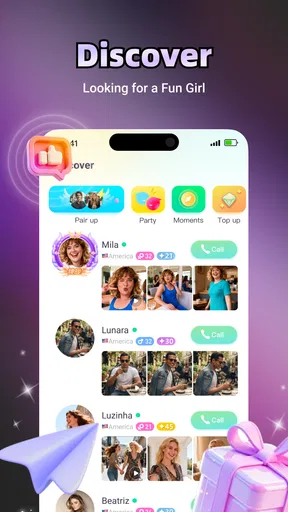
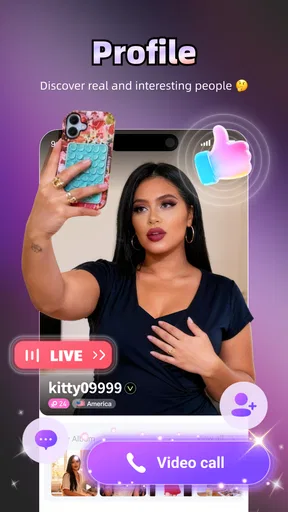
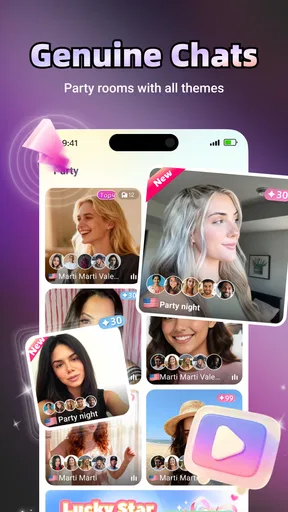
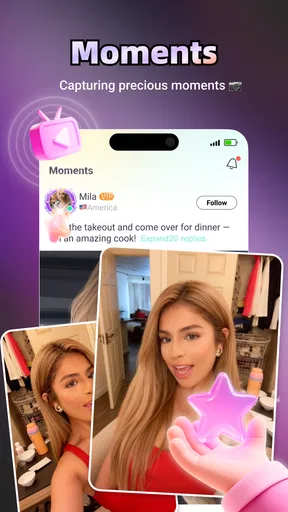

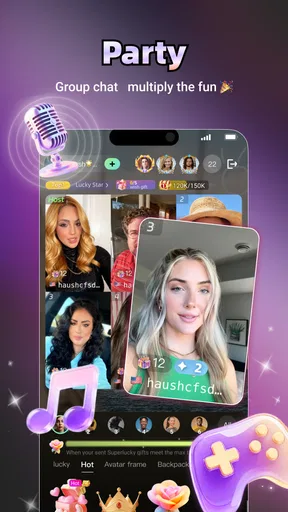
 Analysis by AppCompare
I approached LiveUp- Video Chat as a lifestyle app for people who want more direct, human interaction than ordinary profile browsing provides. Its central idea is simple: use live video conversations to meet interesting people rather than relying only on text. That makes the experience feel immediate, but it also means the app asks more from you than a typical social feed. You need to be comfortable appearing on camera, reacting quickly, and deciding how much personal attention you want to give a stranger.
My overall impression is positive, with an important qualification: this is best for adults who actively want spontaneous video contact, not for someone looking for a quiet, carefully filtered way to socialize. Insight-Innov has positioned the app in the lifestyle space, and the mature audience rating makes the intended context clear. It is free to install, while optional purchases range from small amounts to substantially higher-priced items, so I would approach the paid side carefully and decide in advance what I am willing to spend.
How clearly the experience supports different users
I focus on whether the video-first format feels manageable for different communication styles, energy levels, and access needs. In my view, the most useful test is not whether every interaction goes smoothly, but whether I can set a comfortable pace and leave when the format stops working for me. That perspective helps clarify which users may find the experience welcoming and which may be better served by a quieter alternative.
Readability and navigation in everyday use
The most important accessibility question here is not whether the app has a long list of settings; it is whether I can understand what is happening before I commit to a conversation. A video-chat service needs clear visual hierarchy. I want to know when I am browsing, when a connection is beginning, how to leave, and whether an action is free or connected to an in-app purchase. Those moments matter more than decorative design.
In practice, I would treat the first few minutes as an orientation period. Rather than tapping rapidly through every prompt, I would pause at each screen and identify the main action, the way back, and any visible purchase-related choice. That habit is especially useful for people who read slowly, use enlarged system text, or find busy screens tiring. It also reduces accidental taps, which is a real concern in an app built around quick decisions.
The short store description, “LiveUp- Video Chat,” sets a fairly narrow expectation: video is the heart of the product. That clarity helps because I would not install it expecting a conventional messaging app, a dating diary, or a broad lifestyle toolkit. At the same time, a video-first interface can be harder to scan than a text-based one. Faces, moving previews, badges, and live prompts compete for attention, so I prefer using it when I have enough time to focus rather than while commuting or multitasking.
For users with visual processing difficulties, the difference between a readable interface and an exhausting one often comes from pace. A live conversation does not wait while I inspect every control. My practical approach would be to adjust the phone’s display settings before opening the app, keep the screen free from glare, and use headphones if audio cues help me understand transitions. These are ordinary device-level adjustments rather than special claims about the app itself, but they can make the experience more manageable.
Worth Reading Before You Choose

EA SPORTS FC Mobile 26 Is a Bigger Football Game, but It Takes Time

Flipboard Shows What News Apps Must Do Beyond the Feed

Switching to Android Auto Means Rethinking Your Driving Routine

Google Calendar Makes a Crowded Week Easier to Manage

Ludo King Makes the Most of the Minutes Between Plans

Baby Panda World Brings Quick Play to Modern Phones, but Its Game Library Feels Busy
I also think navigation should be judged by recovery, not only by the first impression. If I enter a conversation by mistake, can I leave without confusion? If a person makes me uncomfortable, can I quickly return to a safer screen? If I am unsure whether I have spent anything, can I stop and check before continuing? Those are the questions I would ask before becoming a regular user. A social app earns trust when its exits are as understandable as its entrances.
Motor and sensory considerations before starting a call
Video chat places several demands on the body at once. I may need to hold or position a phone, tap small controls, follow speech, watch facial expressions, and respond without much delay. Someone with limited hand movement, tremors, fatigue, or difficulty with rapid touch gestures may find this more demanding than a standard text conversation. I would use a stable phone stand whenever possible, because removing the need to hold the device makes the interaction less tiring and keeps the camera steadier.
Audio is equally important. A noisy room can make speech difficult to follow, while a quiet room can make the user feel exposed if other people are nearby. Headphones may improve concentration, but they can also reduce awareness of what is happening around me. I would choose based on the situation: a single earbud when I need environmental awareness, or both headphones when privacy and speech clarity matter more.
People who are sensitive to motion, bright screens, or unpredictable visual changes should be cautious with live video. The appeal of the app is its immediacy, but immediacy can also mean a more stimulating experience than a static profile list. I would lower screen brightness, avoid using the app in a dark room, and take breaks instead of treating every available conversation as something I must accept.
There is also a social sensory issue that is easy to overlook. Video removes some of the processing time that text gives us. I cannot reread a sentence in the same way while someone is speaking, and pauses may feel awkward even when I am simply thinking. If I need more time, I would say so plainly at the beginning. A short explanation such as “I may take a moment to respond” can reduce pressure and helps me see whether the other person is respectful.
My most useful practical tip is to separate camera comfort from conversation comfort. I would first test the camera position, lighting, and audio with a trusted person or in a private preview if the app provides one, without assuming that every screen works the same way. Once the physical setup feels stable, I can judge the social side more fairly. Otherwise, I might mistake a poor angle or distracting background for a problem with the connection itself.
Situational access: when LiveUp fits and when it does not
A realistic use case would be an adult who has finished work, wants to meet someone outside their usual circle, and has twenty quiet minutes at home. In that setting, the app’s live format can feel more rewarding than scrolling through polished profiles. I can quickly learn whether conversation flows, whether the other person listens, and whether we share a sense of humor. That kind of immediate feedback is the strongest reason to choose it over a conventional social network.
It is less suitable in a shared home, a workplace, public transport, or any place where privacy is uncertain. Even if I am only browsing, I would assume that a video-oriented service can attract attention from people nearby. I would not use it while driving, crossing streets, caring for a child who needs supervision, or handling anything that requires full concentration. The app may be casual, but the setting still matters.
For someone who is deaf or hard of hearing, the usefulness of a video-chat service depends heavily on whether the conversation can work visually and whether the other person is willing to communicate patiently. I would not assume that spoken audio is enough. Before investing time or money, I would look for practical signs during an early interaction: does the person face the camera, speak clearly, repeat themselves without irritation, and use visible gestures or text when needed? If not, the service may become frustrating very quickly.
For someone with speech differences, anxiety, or a communication style that does not fit rapid small talk, the app can be both promising and difficult. Video gives me a chance to show personality that text can hide, but it also exposes pauses, nervousness, and differences in expression. I would use a simple opening plan: one sentence about why I joined, one easy question, and a clear way to end the conversation. Having that structure reduces the pressure to perform spontaneously.
People with limited bandwidth or older devices should also think about the environment before relying on live video. A weak connection, low battery, or crowded network can turn a promising conversation into a stop-start experience. I would begin with a short session rather than assuming a long call will be comfortable. The app supports devices running Android 7.0 or newer, which gives it a broad compatibility range, but compatibility alone does not guarantee that every older phone will handle live video with equal ease.
What the audience and payment model mean for inclusion
The app is free to download, which lowers the barrier to trying it. That is useful for users who want to understand the experience before committing financially. However, optional purchases are listed from $0.20 to $249.99 per item. That is a wide range, and I would not treat the free entry point as proof that the entire experience will remain cost-free. Before buying anything, I would identify exactly what the purchase does, whether it is one-time or repeatable, and whether I can enjoy the core interaction without it.
This matters especially for users who need to budget carefully. Live social products can encourage quick decisions because the conversation is happening now. My rule would be to avoid purchasing during an emotionally exciting interaction. I would leave the screen, review the amount calmly, and only return if the cost still makes sense. A small first purchase can feel harmless, but repeated small decisions can become expensive when they are tied to the desire to keep a connection going.
The mature rating is another reason to be deliberate about context. I would not treat the app as suitable for children or younger teens, and I would be cautious about using it around minors. Adults who are uncomfortable with unexpected mature conversations should consider whether a more controlled, text-first community would be a better match. The rating does not automatically tell me what every interaction will be like, so I would keep personal boundaries firm from the start.
The app has reached over five million installs and holds a 4.2 average from around 7.9 thousand ratings. That suggests meaningful interest and generally favorable reception, but popularity does not remove the need for personal judgment. A large user base can improve the chance of finding someone engaging, while also creating a wider range of communication styles and expectations. I would see that scale as an opportunity, not as a guarantee that every match will be worthwhile.
Remaining barriers that affect the experience
The biggest barrier is the demand for immediate visual presence. A person may want to meet others but not want to show their face, reveal their surroundings, or manage the self-consciousness that comes with a live camera. For that user, a text community or audio-first service may be more comfortable. I would not recommend forcing myself through video simply because it is the app’s main feature; the format has to fit my boundaries, not the other way around.
Another barrier is uneven conversation quality. Live matching can expose compatibility quickly, but it can also produce abrupt endings, awkward silence, or people who dominate the exchange. I would judge the app less by whether every interaction is enjoyable and more by how efficiently I can leave unproductive ones. Short conversations are not failures if they help me identify what I do and do not want.
Privacy is a practical concern even without making assumptions about the app’s policies. I would avoid showing mail, documents, school uniforms, house numbers, workplace screens, or distinctive locations in the camera background. I would also keep personal contact details private until trust develops outside the initial interaction. This is particularly important for users who may be more vulnerable to pressure, including people who are lonely, new to online socializing, or eager to maintain a promising connection.
Accessibility can also break down through other people rather than through the interface. Someone may have good vision, clear audio, and a steady phone yet still encounter impatient or dismissive users. I would consider respectful behavior a basic requirement, not an extra benefit. If a person mocks an accent, ignores a request to slow down, pressures me to spend money, or refuses to respect an ending, I would leave immediately rather than trying to repair the interaction.
Version 4.3.6 is the current version, and the app was released on September 12, 2024. Those details are useful when checking whether my device is compatible and whether I am reviewing the current experience, but they do not answer every accessibility question. I would still test the app personally with my own display settings, hearing needs, motor comfort, and network conditions. Accessibility is highly individual, especially in a live service where another person is part of every session.
How it compares with quieter alternatives
Compared with ordinary social feeds, LiveUp- Video Chat offers faster evidence of real chemistry. A profile can be carefully written and a photo can be carefully chosen, but a live exchange shows timing, tone, listening, and spontaneity. I value that when I am tired of endless scrolling. The trade-off is control: a feed lets me choose when to read and respond, while live video asks me to make decisions in the moment.
Compared with text messaging, the app is more expressive but less forgiving. Text is usually better for people who need extra processing time, who communicate more comfortably in writing, or who want a record of what was said. Video is better when facial expression and natural conversation matter. I would choose between them based on my energy and communication needs rather than assuming that one format is universally superior.
Compared with audio-only social services, the app gives more visual information but also creates more appearance-related pressure. Audio can be a useful middle ground for users who want live interaction without being on camera. If I were testing social platforms for someone with strong camera anxiety or sensory sensitivity, I would start with audio or text and move to video only if that person genuinely wanted it.
Compared with carefully moderated interest communities, this app appears more focused on discovering people through direct interaction than on joining a specific topic-based group. That can make encounters feel fresh, but it may provide less built-in structure for finding people who share a particular hobby or identity. Someone seeking organized discussion about books, gaming, language practice, or local volunteering may have a better experience elsewhere. Someone seeking spontaneous one-to-one discovery may find the live format more appealing.
Who I would recommend it to
I would recommend it to adults who enjoy meeting unfamiliar people, can protect a little private time, and are comfortable making quick decisions about conversation. It is especially appealing if I want to judge connection through voice, expression, and back-and-forth rather than through profiles alone. The free download makes experimentation reasonable, provided I keep the purchase model in mind.
I would skip it if I need predictable, low-pressure communication, if I dislike appearing on camera, or if I am looking for a strongly topic-based community. I would also avoid it during periods when I feel especially lonely or impulsive and might spend money simply to prolong attention. In those moments, a slower service with clearer boundaries may support me better.
My preferred workflow is simple: use it in a private, well-lit place; set a time limit; begin without buying anything; keep personal details general; and leave at the first sign of pressure or disrespect. I would also decide what a successful session means before starting. It might be one pleasant conversation, not a new friendship or a long-term connection. That expectation keeps the app enjoyable instead of turning every interaction into a test.
My inclusive verdict
LiveUp- Video Chat is a convincing choice for adults who want social discovery to feel immediate and personal. I like that its video-first identity is easy to understand, and I can see why a large audience has tried it. The strongest experience comes when I have privacy, stable connectivity, enough energy for live conversation, and clear boundaries around spending and personal information.
Its inclusive value is more conditional than universal. The format can work well for people who communicate through facial expression, appreciate quick feedback, or find text profiles too distant. It can be harder for users who need extra processing time, avoid cameras, have sensory sensitivities, or require communication support that other participants may not consistently provide. I would not present it as an answer for every social need.
After weighing those trade-offs, I see it as a worthwhile free experiment rather than an app I would recommend blindly. Try a short session, adjust the physical setup to suit your abilities, and pay attention to how much control you feel you have. If the live format helps you connect without draining your comfort, it may become a useful part of your social routine. If it makes you feel rushed, exposed, or pressured to spend, a text-first or audio-based alternative is likely the kinder choice.
Pros
- Quick access to live video chats with users around the world.
- Interactive features make conversations more engaging than standard messaging.
- User profiles help you discover people with similar interests.
- The app is convenient for casual socializing from your phone.
- Live interactions can feel more personal and spontaneous.
Cons
- Video chats may use significant mobile data and battery power.
- Some features or interactions may require in-app purchases.
- Public live rooms can include unwanted or inappropriate behavior.
- Connection quality depends heavily on your internet speed.
- Privacy settings should be checked carefully before sharing personal details.
FAQs for LiveUp- Video Chat
What is LiveUp- Video Chat and what can I do with it?
LiveUp- Video Chat is a social communication app focused on meeting people through live video conversations. After creating a profile, users can browse available contacts, start video chats, and interact through messaging or other in-app social features. The experience is designed for spontaneous conversations, so the people you meet and the quality of each interaction can vary depending on your location, connection, and current user activity.
Is LiveUp- Video Chat free to download and use?
The app can generally be downloaded without an upfront charge, but some of its features may rely on in-app purchases, virtual credits, subscriptions, or other paid options. These costs can apply when starting particular conversations, accessing premium functions, or sending virtual items. Before using the app extensively, check the current pricing shown in the store listing and inside the application, since fees and available packages may change.
Does LiveUp- Video Chat require an account, camera, and microphone permissions?
To use the main communication features, LiveUp- Video Chat may ask you to create an account or sign in through an available login method. Video calling normally requires access to your device’s camera and microphone, while notifications and storage permissions may support messaging and app functionality. Review each permission request carefully and grant only the access you are comfortable providing. You can usually change permissions later in your phone’s settings.
Is LiveUp- Video Chat safe for meeting strangers online?
As with any video-chat platform, users should remain cautious because conversations may involve people they have never met. Avoid sharing your home address, financial information, passwords, verification codes, or private photos. Use the app’s blocking and reporting tools if someone behaves abusively, requests inappropriate content, or makes you uncomfortable. Parents should also be aware that social video apps may not be suitable for children without close supervision and appropriate privacy controls.
What should I do if video calls are lagging or the app is not working properly?
Video performance depends heavily on your internet connection, device capabilities, camera and microphone permissions, and the app’s current server status. If a call is unstable, try switching between Wi-Fi and mobile data, closing other apps, updating LiveUp- Video Chat, and restarting your device. Check that the application has the required permissions and that your phone has enough free storage. If problems continue, use the app’s support option or the contact information provided on its official store page.


